AI Agent Security and Prompt Injection in Laravel Apps
Published on — Last updated
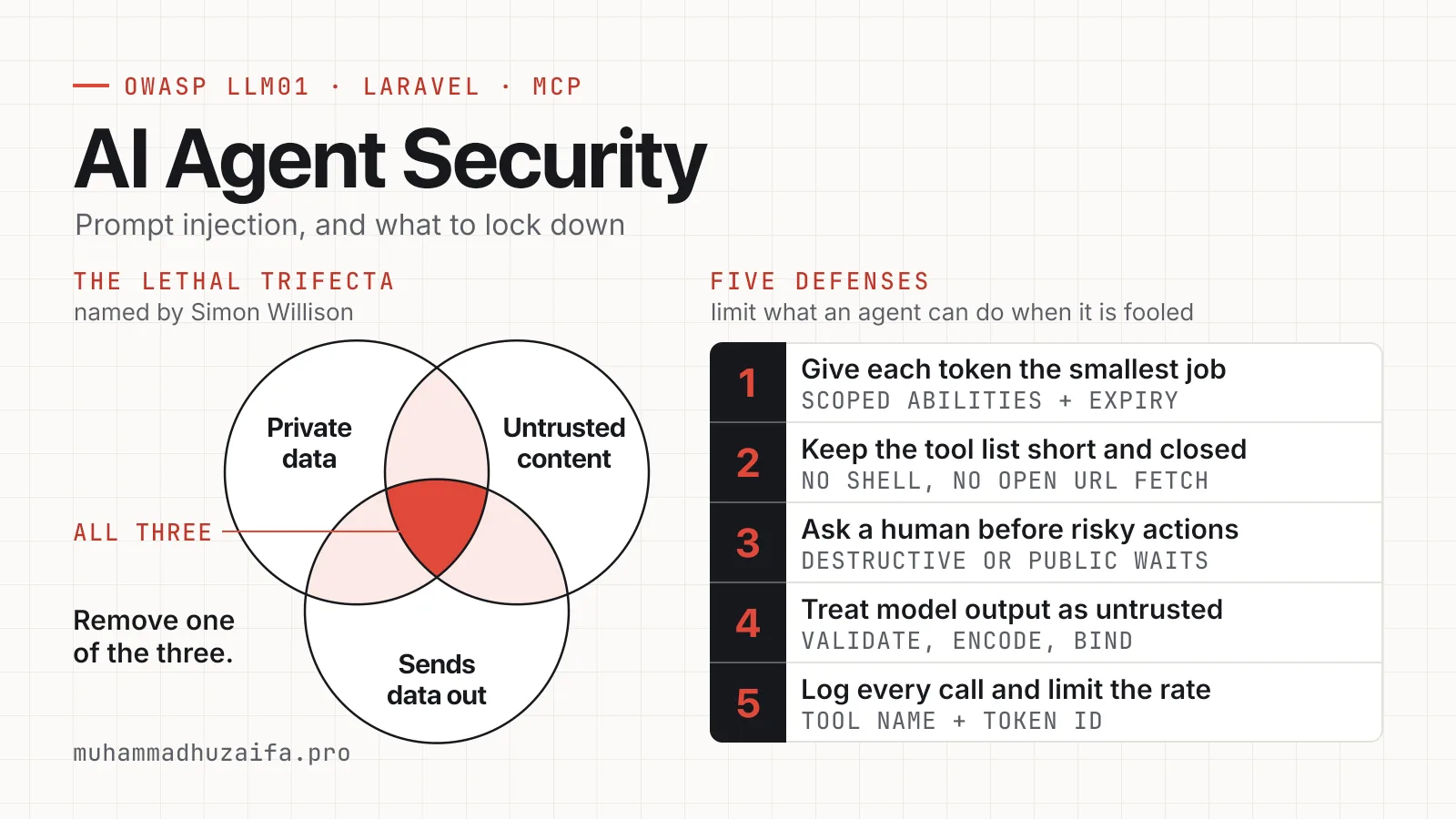
AI agent security starts from one fact. A model cannot reliably tell your instructions from the text it reads, so any text in its path can try to give it orders. This is called prompt injection, and OWASP says it is unclear whether any method can fully prevent it. So the safer plan is to limit what an agent can do when it is fooled.
Below are the defenses I would put in a Laravel app or an MCP server, and a short list of checks for any MCP server.
Why prompt injection does not go away
OWASP lists prompt injection as LLM01 in its Top 10 for LLM applications. As of November 2026, the OWASP page lists the 2025 edition as current. Direct injection comes from the user. Indirect injection comes from outside content, such as a web page or a file the model reads.
OWASP says it is unclear if any method is foolproof, and that RAG and fine-tuning do not fully fix the problem. It lists layered controls instead. These include a narrow role for the model, checking output with plain code, least privilege, and human approval for risky actions.
The dangerous mix was named the lethal trifecta by Simon Willison. The agent can reach private data, it reads untrusted content, and it can send data out. With all three, an attacker can trick it into sending your data away. Remove one of the three.
Invariant Labs showed this in May 2025 with the GitHub MCP server. MCP, the Model Context Protocol, is the standard way an agent calls your tools.
An attacker posted an issue with hidden instructions in a public repo. When the owner asked the agent to review open issues, it pulled data from private repos and leaked it in a pull request on the public repo. Invariant says the flaw is in the design, not in one server, and that many users pick Always Allow and stop checking each call.
Give each token the smallest job
OWASP names three causes of excessive agency. The agent has too many functions, too many permissions, or too much freedom. It says to limit permissions in the downstream system itself, such as the database, and not to trust the model to stay in bounds.
The MCP security best practices page says the same about scopes. This page is part of the draft specification as of November 2026. It lists wildcard and all-access scopes as a common mistake.
Laravel Sanctum can do this. By default its tokens never expire. You can give a token a list of abilities when you create it, and an expiry date as the third argument.
1$token = $request->user()->createToken(2 'reports-agent',3 ['reports:read', 'reports:write'],4 now()->plus(weeks: 1)5);Then check the ability inside the tool, or guard the route with the abilities middleware. Make one token for each agent and each job, so you can revoke one without breaking the others.
Laravel's MCP docs say OAuth with Passport is the most robust choice. They also say Sanctum is fine if your app already uses it.
Keep the tool list short and closed
OWASP prefers narrow tools over open ones such as a shell or a URL fetcher. The MCP specification says servers must validate all inputs, apply access controls, rate limit calls, and sanitize outputs.
Do the access check inside each tool. Laravel's docs show that $request->user() gives you the caller, so you can check permissions in the tool body. Laravel can also hide a tool from some users with shouldRegister, but the docs do not call that a security boundary. I would not rely on it alone.
Tool annotations, such as read-only or destructive, are hints for the model. The MCP specification says clients must treat them as untrusted unless the server is trusted. So the real check belongs in your code.
Ask a human before risky actions
The MCP specification, version 2025-06-18, says there SHOULD always be a human who can deny a tool call. That word is a strong recommendation, not a strict rule. OWASP adds a rule it calls complete mediation. Enforce authorization in the system that holds the data, and do not ask the model whether an action is allowed.
I split actions into three groups. Read-only calls can run freely. Writes that are easy to undo, such as a draft, can run and leave a log. Anything destructive or public waits for a person.
Treat model output as untrusted
OWASP says to treat model output like input from any other user. Validate it before it reaches backend code, encode it for the place where it lands, and use parameterized queries for database calls. In Laravel that means validation rules on every tool argument, Eloquent bindings, and Blade escaping. If you show Markdown from an agent as HTML, clean it first.
The other direction matters too. Whatever your tool returns goes into the model's context. A CRM note, a support ticket, or a post body can hold text from a stranger, and that is how indirect injection reaches an agent. Return only the fields the agent needs.
Log every call and limit the rate
OWASP says logging and rate limits will not prevent excessive agency, but can limit the level of damage. The MCP specification says servers must rate limit, and clients should log tool use for audit.
In my HubSpot MCP server, every request passes token auth first and every tool call is logged. A log line should hold the tool name, the token id, the arguments, and the result. I wrote about why such traces matter in observability for AI agents.
Checks for any Laravel MCP server
I run an MCP server that manages this site. Whatever server you run, check these points before you connect an agent to it.
- Make your tools enforce token abilities, not only the login.
- Set an expiry date on tokens, and keep a way to revoke one at once.
- Log every tool call, with the tool name and the token id.
- Do not let a tool publish content or change something public on the model's word alone. Guard it with its own ability or a human step.
My Laravel Pulse MCP package shows these ideas in practice. It is off until you turn it on, it can only read, approved people sign in through your own app, and sensitive values are hidden before the agent sees them.
A short checklist
- One token for each agent, with the fewest abilities and an expiry date.
- A small set of narrow tools, with no shell and no open URL fetch.
- Permission checks inside the tool code, not in the prompt.
- A human approval step for anything destructive or public.
- Validation on every input, and clean handling of every output.
- A log and a rate limit on every call.
If you are building an agent and want guardrails and evals designed in from the start, my AI engineering page explains how I work. If you want an MCP server built with these guardrails, I offer a fixed-price Laravel MCP server service.