Laravel Boost is a development package that helps AI coding agents work well inside a Laravel app. It gives the agent a local MCP server with tools that read your app, guidelines and skills that teach Laravel habits, and a docs search that matches the package versions you have installed. You add it with Composer and run one Artisan command.
I follow the official Laravel docs for 13.x and the source code of the version in my own project, Boost 2.5.0. Packagist lists newer releases, up to 2.10.4 on 29 October 2026, so some details may differ in yours.
What Laravel Boost is
In the Laravel docs, Boost sits in an AI section next to the AI SDK and the MCP package. The AI SDK lets your own app call AI providers. Boost is different. It helps the agent that writes code for your app, and it only runs while you develop.
Boost has four parts. The first is the MCP server, which gives the agent tools. The second is a set of AI guidelines, loaded at the start. The third is agent skills, loaded only when a task needs them. The fourth is project rules, which are notes about your own app.
Boost is built on laravel/mcp, Laravel's package for MCP servers. If you want the basics of MCP first, read my post on MCP vs API. Boost's server runs as a local Artisan command, so no web route is exposed.
What the MCP tools do
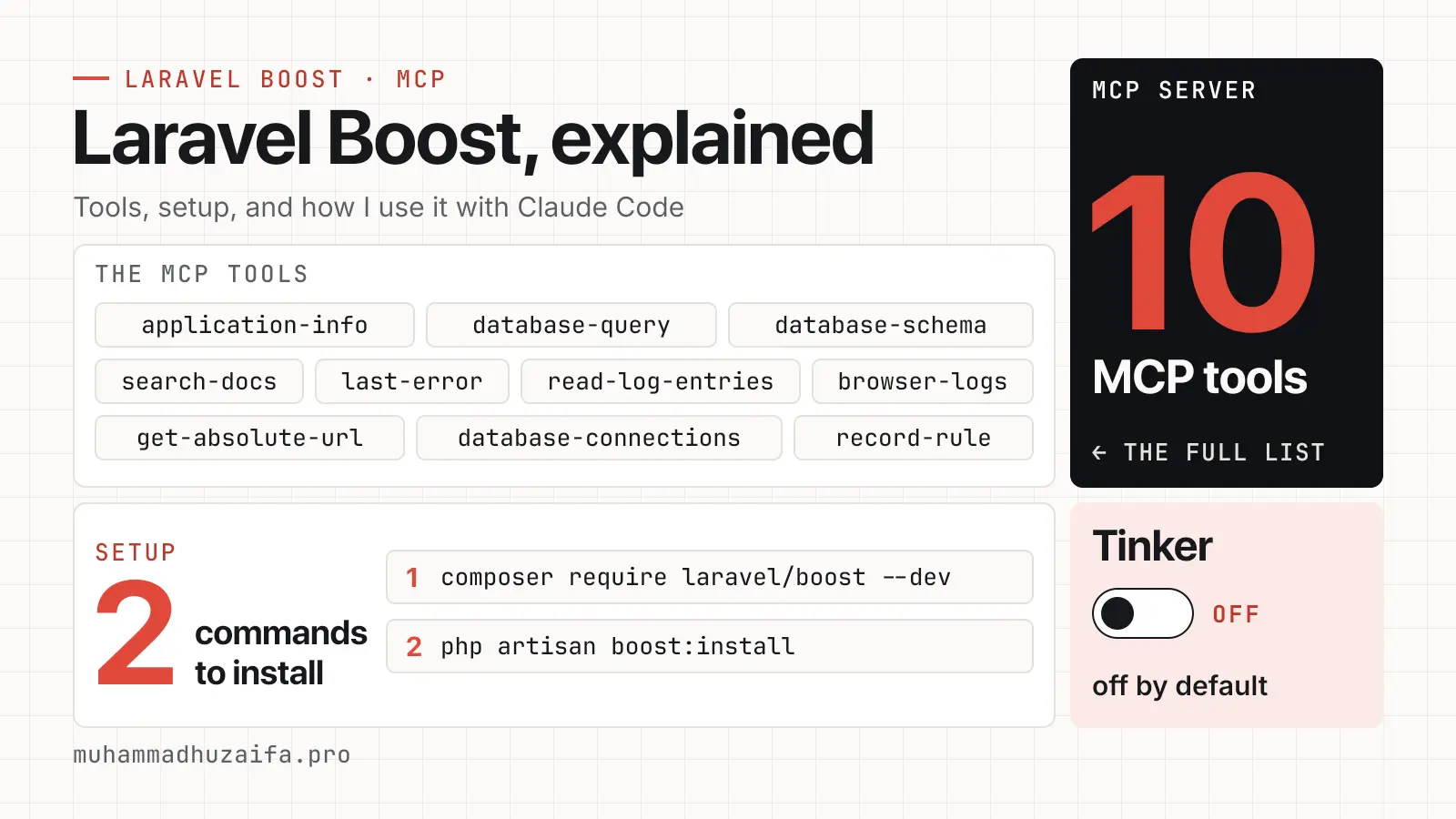
The docs list ten tools. This table follows the docs, and the notes below come from the 2.5.0 source. The 13.x docs say Application Info also lists Eloquent models. I did not find that in the 2.5.0 source, so a newer version may add it.
| Tool | What the agent gets |
|---|---|
| Application Info | PHP and Laravel versions, database engine and installed packages with versions |
| Database Connections | The available connections, including the default one |
| Database Schema | The database structure |
| Database Query | The result of a query against the database |
| Search Docs | Laravel docs that match your installed packages |
| Last Error | The last error from your log files |
| Read Log Entries | The last N log entries |
| Browser Logs | Logs and errors from the browser |
| Get Absolute URL | A full URL built from a relative path |
| Record Rule | A saved project rule in .ai/rules |
Three details matter for safety. First, the database tool is meant to be read-only. In 2.5.0, it checks the first word of the query and allows only commands such as SELECT, SHOW, EXPLAIN and DESCRIBE. That is a check on the query text, not a database permission. The tool also uses your app's database connection, so point your .env file at a local database or a read-only database user.
Second, Search Docs calls a hosted service run by Laravel. In the SearchDocs source file of 2.5.0, the request holds the search queries, your package names with major versions, a token limit and an output format. The Boost docs say the knowledge base holds over 17,000 pieces of Laravel-specific information. That is Laravel's own claim, and I did not count it.
Third, the 2.5.0 source also has a Tinker tool. It stays off unless the boost.tinker_tool_enabled setting is true. The current docs table does not list it.
How the tool descriptions guide the agent
Tool descriptions are written for the model, and Boost uses them well. In the 2.5.0 source, Application Info tells the agent to call it on each new chat and to write code for the package versions it returns. Search Docs tells the agent to use it before any other way of finding Laravel docs. It also says the results fit the package versions in the project.
That is how Boost nudges the agent without a long prompt from you. It is a good model for your own MCP tools. Write each description with the same care.
How to install Laravel Boost
Boost needs PHP 8.2 or newer and Laravel 11, 12 or 13, according to the composer.json of version 2.5.0.
1composer require laravel/boost --dev2php artisan boost:installThe install command asks which agents and features you want. Then it writes the guideline files, skill files and MCP settings for those agents. If a CLAUDE.md or AGENTS.md file already exists, Boost only replaces the text inside its own <laravel-boost-guidelines> block. Your own text outside that block stays.
For Claude Code, setup is usually automatic. If it is not, run this inside the project folder.
1claude mcp add -s local -t stdio laravel-boost php artisan boost:mcpCursor, Codex, GitHub Copilot in VS Code and Junie have their own steps in the docs. For any other tool, you can register the server by hand with the command php and the arguments artisan boost:mcp.
1{2 "mcpServers": {3 "laravel-boost": {4 "command": "php",5 "args": ["artisan", "boost:mcp"]6 }7 }8}After you update packages, run php artisan boost:update so the guidelines and skills match your versions. The docs also show how to run it from a Composer post-update script.
Guidelines, skills and rules
Guidelines are short instruction files that load at the start of every session. Skills hold longer, task-specific advice and load only when needed. The docs say this keeps context small and the advice more relevant.
Boost picks skills from the packages in your composer.json. In my site project, six skills are on. They cover Laravel best practices, Livewire, Volt, Pest, Tailwind CSS and Laravel Debugbar.
Project rules are the newest part. They are Markdown files in .ai/rules that describe how your own app works. You can say remember this to your agent, and it calls the Record Rule tool. An infer-conventions skill can also read your code and suggest rules. This site has no .ai/rules folder yet, so I cannot say how well that part works.
How I use Boost with Claude Code
On this site, the Boost settings list Claude Code and Codex as agents. Guidelines, MCP and six skills are on. The project's .mcp.json runs php artisan boost:mcp, so Claude Code starts the Boost server from the project folder.
The docs say you may ignore the generated files in Git. I commit them instead. That includes CLAUDE.md, AGENTS.md, the Boost settings, .mcp.json and the skill folders.
My own rules live in the same CLAUDE.md, above the Boost block. When the two disagree, mine win. For example, the Boost block in my CLAUDE.md says every change must be tested. My project rule says I write tests only when I ask. I wrote down that project rules beat generated Boost guidance. Because Boost only rewrites its own block, my rules survive an update.
The Boost block also tells the agent to search the docs before it changes code. That is where the Search Docs tool earns its place. The agent can check the docs for the exact Livewire or Laravel version in the project.
I have no numbers on time saved, so I will not make any up. What I can say is what changes in the setup. The agent starts each session with your versions, your schema and your rules in reach.
Limits and cautions
Guidelines cost context. In my project, the Boost block is 185 lines of a 285-line CLAUDE.md file. Claude Code's memory docs suggest keeping each CLAUDE.md under 200 lines, because long files use more context and can reduce how well instructions are followed. Skills help, since they load on demand. The Claude Code docs also say MCP tool definitions wait until needed, so the Boost tools add little until the agent calls one.
The default guidelines are opinionated. Read the block once and fix the parts that clash with your habits, as I did with tests.
Keep Boost out of production. It is a development dependency, and my deploy installs packages without dev ones. And point the database tool at a local copy of your data.
Boost helps an agent write Laravel code that fits your app. It does not check the result for you. Review what the agent changed. Boost also works with other agents, so my comparison of Cursor vs Claude Code may help you choose one.
If you want a Laravel engineer who sets up this kind of agent workflow for a team, see my hire Laravel engineer page. I also offer a fixed-price Claude Code setup for teams that want the same kind of workflow.