Cursor vs Claude Code, an Honest Comparison for 2026
Published on — Last updated
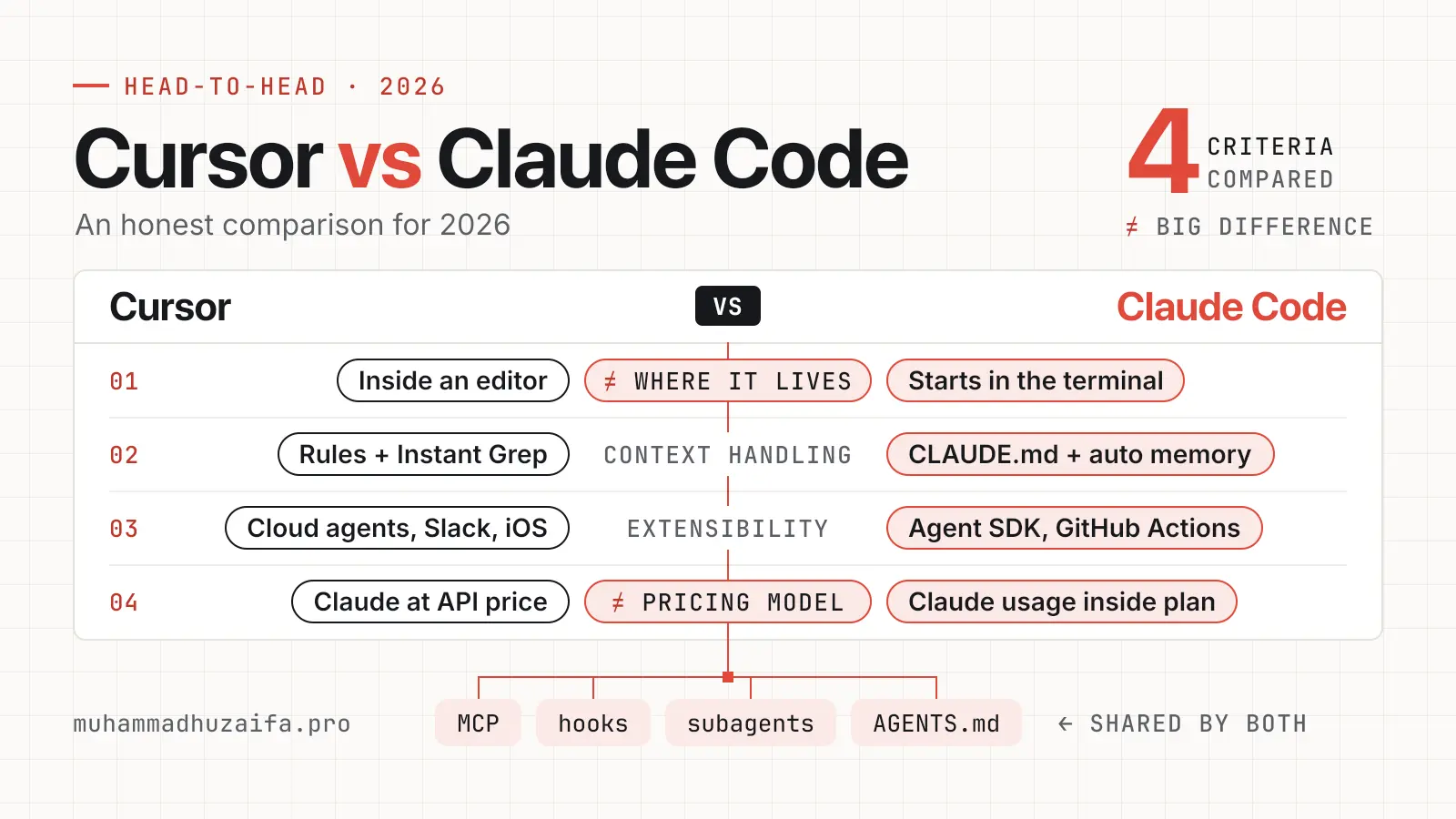
Cursor and Claude Code both let an AI agent read your code, edit files and run commands. The big difference is where you work and how you pay. Cursor is an editor with an agent inside it. Claude Code is an agent that starts in the terminal and also runs in editors, a desktop app and the web.
I use Claude Code on my own projects. For Cursor, I only use its official docs and pricing pages, so this is not a hands-on Cursor review. I checked every price and feature on 21 November 2026. Both products change often, so check the pricing pages before you pay.
How the workflow differs
Cursor works inside an editor
Cursor's docs describe Agent as an assistant that completes tasks on its own, runs terminal commands and edits code. You open it in a side pane. Cursor also lists Tab completions as a core feature. These are suggestions that appear while you type.
Agent has a Plan mode for thinking before coding and an Ask mode for read-only questions. Checkpoints let you restore your files if the agent takes a wrong turn. Cursor says checkpoints are stored locally and are separate from Git.
There is also a Cursor CLI, which you start with the agent command. Cloud agents run in isolated virtual machines. Cursor's cloud agent docs list the desktop app, the web, an iOS app, Slack, GitHub, Linear and an API as ways to start one.
Claude Code starts in the terminal
Claude Code's docs describe a loop with three phases. It gathers context, takes action and verifies the result. You give it a task in plain words. It searches files, edits several of them and runs your tests.
The docs list the CLI, a desktop app, VS Code, JetBrains, the web and mobile. They say the same engine runs everywhere. They also say scripting and the Agent SDK are CLI only.
For safety, Claude Code's docs describe permission modes that you cycle with Shift+Tab. They also describe checkpoints that let you rewind file edits with one command. Anthropic notes that checkpoints cover file changes only. They cannot undo actions on remote systems such as databases or APIs.
The feature lists now overlap
Both tools support MCP servers, hooks, subagents, skills and AGENTS.md files. Cursor can even load hooks written for Claude Code. So a feature list will not decide this for you. Your daily habits and your budget will.
How each one handles context
Context is what the model can see at one time.
Claude Code
Each session starts with a fresh context window. Two things carry knowledge forward. CLAUDE.md files hold instructions you write. Auto memory holds notes that Claude writes itself. Every session loads your CLAUDE.md files. When auto memory is on, it also loads the first 200 lines or 25KB of MEMORY.md.
Subagents use their own context window and return only a summary. That keeps big file reads out of your main chat. When a long session gets full, the compact command replaces the history with a summary and reloads your project CLAUDE.md from disk. By default, MCP tool definitions wait until they are needed, so only tool names use space at the start.
Anthropic is clear on one point. CLAUDE.md is context, not enforced configuration. To block an action every time, use a hook.
Cursor
Cursor uses rules. Project rules live in the .cursor/rules folder, and an AGENTS.md file is the simple alternative. There are also user rules and, on team plans, team rules. Cursor says rule content goes at the start of the model context.
For search, Cursor built a tool called Instant Grep. Cursor says it builds its index on your machine, does not upload file paths or code for it, and does not store embeddings of your codebase for search. Cursor also says it beats ripgrep on large codebases. That is a vendor claim, and I have not tested it. Like Claude Code, Cursor can start an Explore subagent with its own context window for wide searches.
What this means
The two designs are close. Each loads a Markdown instruction file first, and each uses a helper agent to keep big searches out of the main chat. I cannot tell you which one finds the right file more often. The docs make no head-to-head claim, and I have not measured it.
What each one costs
I checked these pages on 21 November 2026.
Cursor pricing
New customers can buy The X Subscription, which bundles Grok, Grok Bot, Cursor and X Premium. Cursor's help page lists these plans.
| Plan | Price per month | Included usage |
|---|---|---|
| Free | $0 | Limited |
| Plus | $8 | Base |
| Premium | $30 | 4x Plus |
| Super | $100 | 15x Plus |
| Ultra | $200 | 50x Plus |
Teams seats cost $30, $100 or $200 each, matching the same tiers. Each paid plan has a weekly usage pool for Cursor's own models, which are Grok and Composer. The pool refreshes every week.
Here is the part that matters if you like Claude models. Third-party models such as Claude, GPT and Gemini are not in the pool. On Premium and above, they cost the API list price, paid from prepaid credit. Plus does not offer them at all. Anthropic's pricing page lists Claude Sonnet 5.5 at $2 per million input tokens and $10 per million output tokens. On Teams and Enterprise, Cursor adds a token rate of $0.25 per million tokens on eligible third-party models.
Many online guides still show Hobby, Pro at $20 and Pro+ at $60. Cursor's help page lists those same prices, but it says those older plans continue for existing customers and are not available to new customers. If a guide and Cursor disagree, trust Cursor's page.
Claude Code pricing
Claude Code comes with paid Claude plans. The Free plan does not include it. Anthropic's pricing page lists these plans.
| Plan | Price per month | Usage |
|---|---|---|
| Pro | $17 billed yearly or $20 billed monthly | 1x, with limits every 5 hours and every week |
| Max | $100 | 5x Pro usage every 5 hours and every week |
| Ultra | $200 | No 5-hour limit for verified accounts, and 10x Pro usage every week |
Instead of a plan, you can pay API prices through an Anthropic Console account. Anthropic's cost page says Claude Code charges by API token use. For enterprise teams, Anthropic quotes an average of about $13 per developer per active day, or $150 to $250 per developer per month. It also says 90% of users stay under $30 per active day. These are vendor-quoted numbers, so treat them as a rough guide.
What this means for your bill
Neither page gives limits in tokens. Both give multiples of a base plan, so I cannot give you a price per task. The clear difference is this. In Claude Code, Claude usage sits inside your plan limits. In Cursor's new plans, Claude models are billed on top at API list price. If Claude is the model you want, compare a Claude plan with a Cursor plan plus prepaid credit, using your own usage.
Strengths and limits
Cursor
Cursor's strengths are Tab completion, a full editor and models from several vendors in one place. Cloud agents are another strength, because Cursor's docs let you start them from an iOS app or Slack. Cursor's pricing page lists single sign-on and team-wide privacy settings for Teams, and audit logs for Enterprise.
Its limits are the extra cost of third-party models on new plans and a weekly usage pool. Plan names and prices also changed recently, so older guides can mislead you.
Claude Code
Claude Code's strengths are terminal work and automation. It runs in scripts, in GitHub Actions and through the Agent SDK. CLAUDE.md, auto memory, subagents, skills and hooks give you many ways to shape it. Claude usage sits in one plan.
Its limits are the need for a paid Claude plan or an API account, and the usage limits every 5 hours and every week. It also focuses on tasks, not on suggestions while you type. For visual diff review, you use the desktop app or an editor extension.
Which one should you pick?
Pick Cursor if you spend your day in an editor, want suggestions as you type, or want to switch between model vendors.
Pick Claude Code if you like the terminal, want to run agents in scripts or CI, or already pay for a Claude plan.
You can also use both. Claude Code has a VS Code extension, and Cursor can run Claude models at API price. Both can read an AGENTS.md file, so one instruction file can serve both.
What are the other Claude Code alternatives?
Cursor is the one most people compare, but it is not the only choice. The Cursor CLI is the closest terminal option. It has Agent, Plan and Ask modes, and a print mode for scripts and CI. Laravel Boost's docs list Cursor, Claude Code, Codex, GitHub Copilot in VS Code and Junie as supported agents. I did not compare those here.
Whichever tool you pick, check what the agent did, not only what it said. I wrote about this in Agent Evaluation, Why Tool Traces and Verification Matter. If cost worries you, send simple tasks to cheaper models. My PHP classifier for smart model routing shows one way.
If you want help adding AI agents to a Laravel codebase, my AI engineering page explains how I work. If you choose Claude Code and want it set up well for your project, I offer a fixed-price Claude Code setup.